
In recent weeks, I have noticed a significant uptick in the use of “.onmicrosoft.com” domains for phishing attempts. It seems that the attackers have been setting up multiple trial Microsoft 365 accounts, automatically activating Exchange Online. They are exploiting this as a temporary method to send out phishing emails.
At one point, I observed nearly 100 different “.onmicrosoft” domains distributing identical phishing emails to various target domains in just a few hours. Since these phishing emails were slipping through several security measures, I recognized the urgency of implementing measures to secure the targeted domains from these campaigns. Additionally, I established a monitoring system to track all emails that were quarantined due to our new implementation, which I anticipated might occasionally include false positives due to users who communicate with Exchange Online tenants that could have been incorrect configured.
Hunt for incoming emails from a .onmicrosoft.com domain
Below is a KQL sample that compiles a list of all inbound emails received within the past 30 days originating from an .onmicrosoft.com domain. It’s crucial to thoroughly review this data before taking any action to quarantine the emails since it could contain a lot of false positives.
When you have analyzed the data and understand the impact of implementing a Mail Flow rule that will quarantine all these emails it’s time for the next step, creating a detection for all emails that will be delivered to the quarantine after we have implemented the Mail Flow rule.
// Hunt for inbound emails from specific senderfromaddress domain
EmailEvents
| where Timestamp > ago (30d)
| where EmailDirection == "Inbound"
| extend SenderFromAddress = tostring(split(SenderMailFromAddress, "@")[-1])
| where SenderFromAddress contains "onmicrosoft.com"
| project Timestamp, NetworkMessageId,SenderFromAddress, SenderFromDomain, RecipientEmailAddress,Subject, DeliveryAction,DeliveryLocation, LatestDeliveryAction, ThreatTypes,DetectionMethods, EmailAction
| sort by Timestamp desc
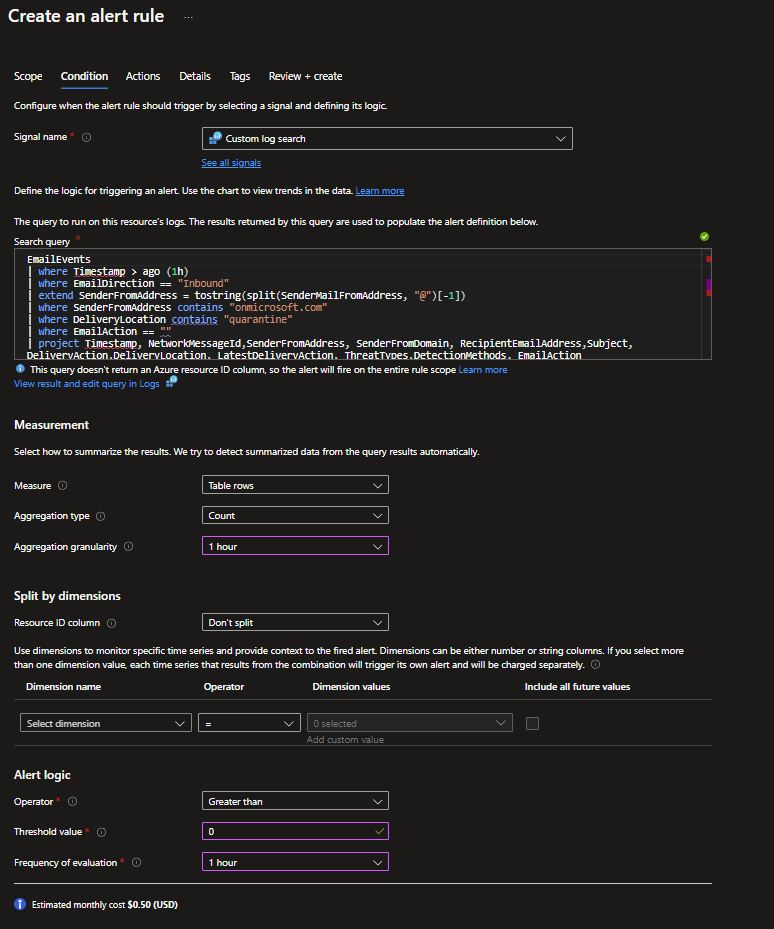
Create an Alert Rule when emails with a .onmicrosoft.com domain have been delivered to quarantine due to a Mail Flow rule.
This presented a bit of a challenge to decipher. When you set up a Mail Flow rule to direct an email to quarantine, you will find this information in the defender portal under Email Entity analysis data, as shown below. However, it appears that this data is not accessible in the advanced hunting data. While there is some data in EmailEvents and the additionaldata field, unfortunately, it does not seem to be available when applying a Mail Flow rule that quarantine the message.
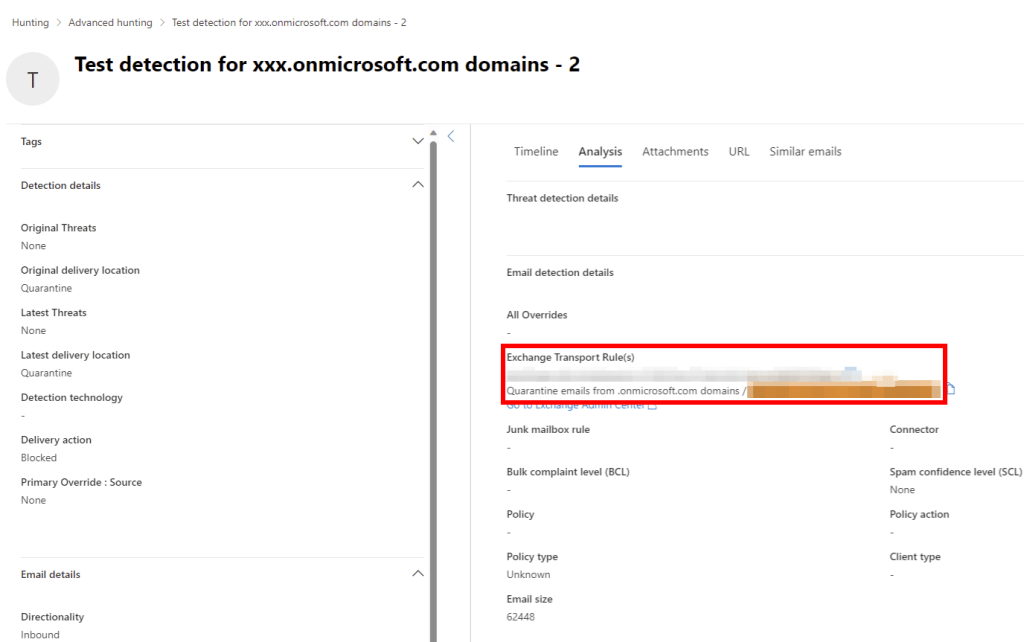
Normally, when EOP & MDO dispatch an email message to quarantine, the EmailAction field is populated with the data “Send to quarantine”. However, if you route an email directly to quarantine through a Mail Flow rule, this field remains empty. The following detection method relies on on the assumption that you have just one Mail Flow rule responsible for sending emails to quarantine with the .onmicrosoft.com domain. This way, we will specifically identify emails with an .onmicrosoft.com domain that have been routed to quarantine via the Mail Flow rule we are about to create.
EmailEvents
| where Timestamp > ago (1h)
| where EmailDirection == "Inbound"
| extend SenderFromAddress = tostring(split(SenderMailFromAddress, "@")[-1])
| where SenderFromAddress contains "onmicrosoft.com"
| where DeliveryLocation contains "quarantine"
| where EmailAction == ""
| project Timestamp, NetworkMessageId,SenderFromAddress, SenderFromDomain, RecipientEmailAddress,Subject, DeliveryAction,DeliveryLocation, LatestDeliveryAction, ThreatTypes,DetectionMethods, EmailAction
| sort by Timestamp desc
Alert Rule
Create a mail flow rule to send emails with a .onmicrosoft.com domain to quarantine
- Elevate yourself to Exchange Administrator
- Sign-in to the Exchange Admin Centre
- Open “Rule” under Mail flow
- Create a new rule with the following settings
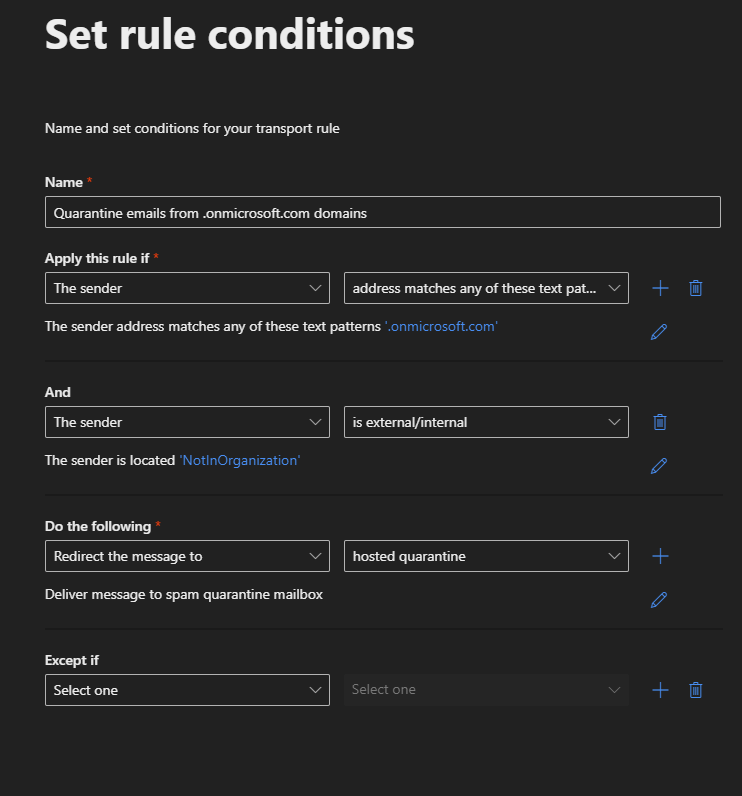
Additionally, ensure that end-users receive notifications when an email have been directed to quarantine. They should also have the capability to preview and request the release the email in quarantine for easier management.
 Microsoft 365 Security blog by Pontus Själander
3 replies on “How to Safeguard Against Phishing Attacks Using .onmicrosoft.com Domains”
Nice write-up! Good security awareness information to all Email Administrators out there.
LikeLiked by 1 person
Thanks, glad you like it!
LikeLike
Your content is being claimed as someone elses work.
Proactive Strategies Against “.onmicrosoft.com” Phishing Attacks (cloudthat.com)
LikeLike